
Practice Exams with Lab Simulator for Network+ Updated to N10-009 on SimulationExams.com

SimulationExams.com is pleased to announce the latest update to its Practice Exams with Lab Simulator for Network+, now aligned with the current N10-009 certification exam objectives. This update provides refreshed learning content and an improved preparation experience, helping candidates prepare confidently for the newest version of the Network+ certification.

Complete Preparation with Exams and Labs
The software combines structured practice exams with interactive virtual lab exercises to create a balanced learning environment. This integrated approach enables candidates to strengthen conceptual understanding while also developing practical networking skills required for real-world scenarios.

Key learning advantages include:

  • Realistic practice exams for accurate self-assessment
  • Scenario-based virtual labs for hands-on configuration and troubleshooting
  • Step-by-step learning support aligned with certification objectives
  • Performance tracking to measure readiness and progress

Updated for the N10-009 Certification Objectives
With the transition from N10-008 to N10-009, the overall preparation package has been carefully reviewed and refreshed to reflect the latest networking technologies, revised topic coverage, and modern troubleshooting methods expected in today’s certification exam.

This ensures that learners using simulationexams.com continue to study with current, relevant, and exam-aligned material.

Practical skill development with Lab simulator
The included Lab simulator delivers guided, interactive networking scenarios that reinforce theoretical knowledge through hands-on experience. These labs help candidates understand real-world implementations, improve troubleshooting confidence, and build the practical competence needed for certification success.

Available Now on SimulationExam.com

The updated Practice Exam with Lab Simulator for Network+ is now available on simulationexam.com. Candidates preparing for the latest Network+ certification can access the newest version and continue their preparation using fully updated and aligned study resources.

Download Link: Download Practice Exams with Lab Simulator for Network+
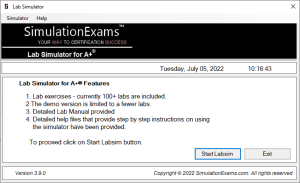
Introducing the Updated A+ Practice Exams with Lab Simulator on SimulationExams.com

Preparing for the A+ certification is not only about reading concepts – it requires consistent practice, real exam experience, and hands-on troubleshooting skills. To support learners more effectively, the Practice Exams with Lab Simulator for A+ available on simulationexams.com has been newly updated with improved content, enhanced labs, and a smoother exam experience.

    This complete package combines:

  • A+ Core 1 Practice Exam Simulator
  • A+ Core 2 Practice Exam Simulator
  • Interactive A+ Lab Simulator

All three components are delivered in a single, easy-to-use application designed to guide candidates from learning to certification readiness.

A Complete Learning Path in One Place
Instead of switching between multiple tools, this software provides a structured preparation journey:

  1. Understand concepts through detailed explanations.
  2. Test knowledge using realistic practice exams.
  3. Apply skills inside hands-on lab simulations.

This step-by-step approach helps learners build confidence gradually and ensures they are fully prepared for the real certification exam.

Key Improvements in the latest update
The Core 1 and Core 2 exam simulators now feature:

  • Carefully reviewed and corrected questions
  • Clearer answer explanations for better understanding
  • Coverage aligned with current A+ exam objectives

These refinements help candidates focus on relevant topics that matter most for certification success.

More Realistic Exam Environment
The updated simulator experience includes:

  • Exam interface similar to the actual certification test
  • Timed exam mode for real exam pressure
  • Detailed score reports highlighting strengths and weak areas

This allows learners to practice strategically and improve performance before the real exam day.

Strengthened Hands-On Lab Experience
Practical skills are essential for IT professionals.
The Enhanced A+ Lab Simulator now provides:

  • Updated troubleshooting and configuration scenarios
  • Improved usability and smoother navigation
  • Real-world tasks that reflect workplace situations

These labs help candidates move beyond theory and gain true technical confidence.

Why this update Matters for A+ Aspirants
With this improved software, learners can:

  • Prepare using accurate and up-to-date content
  • Experience real exam-like testing conditions
  • Develop practical troubleshooting abilities
  • Monitor progress throughout preparation

This makes the software suitable for beginners, students, and working professionals aiming to earn the A+ certification.

Start Practicing with Confidence

The updated Practice Exam with Lab Simulator for A+ on simulationexams.com delivers a balanced combination of knowledge testing and practical learning in one powerful tool.

If you are planning to achieve A+ certification, this all-in-one preparation solution can help you study smarter, practice better, and succeed faster.

Begin your preparation today and take the next step toward becoming a certified IT professional

Download Link for A+ Labsim: Download A+ Labsim

A+ LabSim Updated in SimExams

We are excited to announce that the A+ LabSim has now been successfully updated in simulationexams.com. This update ensures that learners using either platform receive the most current syllabus coverage, improved lab simulations, and a more effective hands-on learning experience for A+ certification preparation.

Updated Learning Experience for A+ Certification
The A+ LabSim is designed to provide practical, scenario-based training aligned with the latest objectives. With this update in Simulationexam, user can now benefit from:

  • Enhanced hands-on lab exercises
  • Realistic troubleshooting scenarios
  • Better alignment with current A+ exam objectives
  • Improved user interface and navigation
  • Smoother performance and stability.

These improvements help learners move beyond theory and develop real IT support skills required in professional environments.

Consistent Updates Across Platforms
By bringing new update for A+ LabSim, we aim to maintain consistency, quality, and reliability across our learning platforms. Learners can now enjoy the same updated content, realistic labs, and improved usability regardless of the platform they choose.

Conclusion:

The latest update to A+ LabSim in simulationexams.com marks an important step in delivering modern, hands-on certification training. With updated syllabus coverage, enhanced simulations, and improved learning experience, pratical IT skills for their careers.

Download Link: Download A+ Labsim 

ExamGuides.com: Your Go-To Resource for IT Certification Prep

In the fast-paced world of IT certifications, having the right study resources can make all the difference in your success. Whether you’re preparing for entry-level exams like CompTIA A+ or advanced certifications such as CCNP, ExamGuides.com offers a wealth of tools to help you achieve your goals. From CCNA exam cram notes to hands-on Network+ labsim tools, ExamGuides.com caters to a variety of learners across different IT domains.

What ExamGuides.com Offers

ExamGuides.com is a comprehensive online platform providing high-quality study materials for various IT certifications, including Cisco, CompTIA, and Juniper. It is tailored for both beginners and professionals aiming to boost their careers in networking, cybersecurity, and IT infrastructure.

Key Resources on ExamGuides.com

  1. Cisco Certification Resources
    • CCNA Exam Cram: ExamGuides.com provides concise, focused notes to help you quickly grasp key topics for the CCNA certification. These study notes are ideal for those looking to review essential concepts like IP addressing, routing protocols, and VLANs.
    • CCST Cybersecurity Exam Cram: For beginners aiming for Cisco’s foundational cybersecurity certification, the platform offers targeted materials that simplify complex topics such as threat detection and basic security policies.
    • CCNP Study Notes: Advanced learners can benefit from in-depth study guides covering Cisco’s enterprise-level certification topics like network design, troubleshooting, and advanced routing.

    Explore Cisco resources: Cisco Certifications.

  2. CompTIA Certification Materials
    • CompTIA A+ Practice Tests: Perfect for entry-level IT professionals, these practice tests simulate the real A+ exam environment, helping candidates gain confidence in topics like hardware troubleshooting, operating systems, and networking basics.
    • CompTIA Network+ Labsim: Hands-on practice is essential for mastering networking concepts, and ExamGuides.com offers lab simulations to help candidates practice configuring and troubleshooting networks.

    Learn more: CompTIA Certification Guides.

  3. Juniper Certification Resources For professionals working in Juniper environments, ExamGuides.com provides essential study materials to help you pass certifications like JNCIA, focusing on Juniper-specific networking technologies and solutions. Visit Juniper resources: Juniper Certification Prep.
  4. Lab Simulations (Labsims) Practical experience is a critical component of IT learning, and the platform offers labsim tools for various certifications like A+ Lab Simulator and Network+ Lab Simulator. These virtual labs allow candidates to practice skills like setting up networks, troubleshooting issues, and configuring devices—all in a risk-free environment. Explore lab simulators: Lab Simulators.

Why Choose ExamGuides.com?

  1. Wide Range of Certifications ExamGuides.com covers a broad spectrum of IT certifications, from foundational certifications like CompTIA A+ to specialized certifications such as Cisco CCNP and Juniper JNCIA.
  2. Accessible Exam Cram Notes With concise and targeted materials like CCNA exam cram and CCST cybersecurity exam cram, the platform makes it easy for candidates to review key concepts without being overwhelmed.
  3. Hands-On Learning with Labsims The platform’s Network+ labsim and other virtual labs provide an interactive, practical way to master exam topics.
  4. Affordable and Reliable ExamGuides.com provides cost-effective resources that don’t compromise on quality, making it a great choice for learners on a budget.

Conclusion

Whether you’re just starting your IT journey or advancing to higher certifications, ExamGuides.com is an excellent resource for exam preparation. Its range of offerings, from CompTIA A+ practice tests to advanced CCNP study notes, ensures that candidates of all skill levels are well-equipped for success. The inclusion of practical tools like labsims further enhances learning, bridging the gap between theory and application. Check out ExamGuides.com today to kickstart your IT certification journey and gain the confidence you need to pass your exams with flying colors. Visit their site to explore resources:

Prepare smarter, pass faster, and excel in your IT career with ExamGuides.com!

Sim-Ex Practice Tests for CCST CyberSecurity Update

Simulationexams.com, a website that helps people practice for exams, has updated Sim-Ex practice tests for CCST CyberSecurity. These tests have over 250 questions and explanations for each one. Cybersecurity is important because attacks on digital information are increasing, and it’s crucial to protect against them. Simulationexams.com also offers Lab Simulators for A+ and Network+, like A+ Labsim and Network+ Labsim, where you can practice working with networks in a virtual environment. The new practice tests are designed to help people understand cybersecurity better and get ready for exams. They also have other practice tests for networking. You can try them out before you decide to buy. These CCST cybersecurity tests are useful for people who want to work in computer security. They include hands-on practice (optionally) and simulation questions to help you prepare. About CyberSecurity:

Cybersecurity is the practice of protecting information either in storage or in transit, from unauthorized access or attacks that are aimed at exploitation. Essentially, it’s about safeguarding digital information and systems from theft, damage, or unauthorized access. Cybersecurity involves a range of techniques, technologies, and processes that work together to keep information safe. This can include things like encryption to make data unreadable to anyone without the proper key, firewalls to block unauthorized access to networks, antivirus software to detect and remove malicious programs, and regular security updates to patch vulnerabilities in software. The goal of cybersecurity is to reduce the risk of cyber attacks and protect against the loss of sensitive information, financial loss, and damage to reputation that can result from such attacks. It’s a constantly evolving field, as new threats and vulnerabilities emerge, requiring ongoing efforts to stay ahead of potential attackers.

Disclaimer: Sim-Ex is a brand name of anand software and training private limited, and the study material provided under Sim-Ex bran is copyright of the company. Anand software and training is not associated with any other company and CCST is a brand name of Cisco Systems.

Lab Sim for Networkplus Update

The Simulationexams.com has recently received an updated Network+ Lab Simulator. The update includes adding a few additional labs on the most recent Network+ certification exam objectives.

  1. Identifying Security threat features ( such as Malware , Spyware etc.)
  2. Identifying Network Devices ( such as HVAC, loT etc.)
  3. Identifying the network characteristics managed by QoS (such as Bandwidth, Jitter etc.)
  4. Identify the features of various virtualization concepts (such as vNIC, Hypervisor etc.)
  5. Identify the features of various troubleshooting tools (OTDR, Cable Tester etc.)
  6. Identify and compare cloud service models (such as SaaS, PaaS etc.)
  7. Identifying Different APC Connector Types
  8. Identifying Ipv6 address Type
  9. Matching the Wi-Fi Standards with speed and frequency bands

Topics Covered include

  1. Networking Fundamentals and WorkStation (WS) Labs
  2. Access Point and DHCP Configuration Labs
  3. Router Configuration and Troubleshooting Labs
  4. Switch Configuration and Troubleshooting Labs
  5. Scenario labs – Home and Small Office Networks

Check this out for complete list of labs available for practice:

Labsim for Network+ Available Labs

Lab Simulator for A+ update

Prepare for your CompTIA A+ certification with labs from

Lab Sim for A+

Recently A+ Lab simulator is updated with adding few more labs on Windows 10 OS

1. Manage Location services in Windows 10
2. Manage app permissions for camera in Windows 10
3. Auto Lock using Screen Saver in Windows 10
4. Uninstall or remove apps and programs in Windows 10
5. To stop automatic updates in Windows 10

Click the Start Labsim button as shown in the below fig. to launch the lab simulator.


A+ Labsim Update

Lab Simulator for CompTIA® A+ provides hands-on experience for candidates intending to prepare for A+ certification. The software comes with several ready made labs.

Recently A+ Lab simulator is updated with adding few labs on Windows 10 OS

1. Manage Location services in Windows 10
2. Manage app permissions for camera in Windows 10
3. Auto Lock using Screen Saver in Windows 10
4. Uninstall or remove apps and programs in Windows 10
5. To stop automatic updates in Windows 10
6. Creating a system image backup of Windows 10
7. Setting up and uploading files to OneDrive in Windows 10
8. Backup files to another drive in Windows 10
9. Restore the files backed-up before in Windows 10
10 Formatting hard drive in Windows 10
11. Turning On/Off BitLocker for Data Drive in Windows 10
12. Installing/Updating graphic card driver in Windows 10

The demo software has all the features of the full version, but limited to a few number of labs. Full version may be activated online using the link below:

https://www.simulationexams.com/LabSim/aplus-lab-simulator.htm

Disclaimer: CompTIA® is a registered trademark of CompTIA® organization. CompTIA A+® is a trademark of CompTIA and duly recognized.

Allows to see if your installed application is up-to-date, or if there are any updates available.

Disclaimer: CompTIA® is a registered trademark of CompTIA® organization. CompTIA A+® is a trademark of CompTIA and duly recognized.

Allows to see if your installed application is up-to-date, or if there are any updates available.

CompTIA Network+ Labsim Update 

Network+ Labsim Update

Simulationexams.com, a leading practice tests and lab sims developer, recently updated Network+ Labsim. The update includes some bug fixes and improvements in the user interface. Network+ cert, offered by Comptia consists of performance based questions that expects candidates to have hands on experience in real world network environment. The labsim, offered by simulationexams.com consists of dozens of practice labs offering rich experience to various networking scenarios similar to those typically encountered in the actual exam.The labs offered using labsim product are listed  here:

  • Networking Fundamentals and WorkStation (WS) Labs
  • Access Point and DHCP Configuration Labs
  • Router Configuration and Troubleshooting Labs
  • Switch Configuration and Troubleshooting Labs
  • Scenario labs – Home and Small Office Networks

Check out the URL for complete list of labs available for practice:

https://www.simulationexams.com/LabSim/networkpluslabs/networkplus-lab-index.htm

Apart from the ready made labs, one can create one’s own labs using the design interface. Devices supported include workstations, servers, switch and routers.

Other labsims available incule Comptia A+ Labsim and Juniper Netsim.

SimulationExams.com Labsim Update

Simulationexams.com, leading practice tests provider, recently updated Network+ lab simulator with additional labs and fixing known bugs. The labsim offers virtual labs for hands-on practice and useful for candidates preparing for A+ and Network+ exams, offered by Comptia organization. The available labs include DNS/DHCP configuration, motherboard components identification, MB connector configurations, peripherals configuration, hardware troubleshooting, and OS installation and configurations. The software is available in both trial and full versions, and may be downloaded from the product home page given below:

http://www.simulationexams.com/LabSim/network-lab-simulator.htm 

Alternatively, it is available with exam simulator, offering both labsim and examsim in the same package. For more information, please visit the product page here:

http://www.simulationexams.com/exam-details/comptia-netplus-practice-tests-with-labsim.htm

 Disclaimer: All trademarks are trademarks of their respective owners and duly  acknowledged. A+™, Network+™, i-Net+™, Server+™,Security+™ are registered trade marks of CompTIA®. The practice tests material is a copyright of SimulationExams.com and the same is not approved or endorsed by respective certifying bodies.