1.0 Personal Computer Components
Mouse, and keyboard are essential parts of a personal computer, and brief description given below:
Mouse:
A mouse is an input device that is used to select and click an object on a computer screen. The Mouse is represented by a pointer (arrow) on your monitor. Types of mouse:
1. Mechanical mouse: Mechanical mouse uses rollers to find relative position of the mouse. The design has been used for several years, but it is being over taken by Optical mouse. The biggest disadvantage of mechanical mouse is that it requires periodic cleaning of the moving parts for proper functionality. The mouse is connected to the motherboard using USB or PS/2 connector.
2. Optical mouse: This type of mouse uses optical sensing for finding the relative position of mouse pointer. Since it involves no moving parts, there is no maintenance required on the mouse parts. It is rugged, and convenient to use. But, it is still connected to the motherboard using a cable.
3. Laser mouse: This type of mouse uses rf/laser to communicate with the CPU box. As it is free from moving parts, and connected to the CPU box without any wires, it is most convenient to use. However, it is more expensive compared with mechanical or optical mice.
Mouse buttons: Normally there are two buttons associated with a mouse. One button (usually left button) is used to select any object on the screen (and fire any event). The right mouse button is used to bring up any contextual menu when clicked. Optionally, there will be a middle button, or a wheel that can be used to navigate through the screen display.
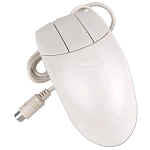
Mechanical Mouse (Top)
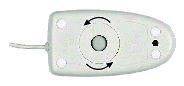
Mechanical (ball) mouse Bottom View
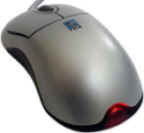
Optical Mouse
The different mouse operations are:
Point: Move the mouse so that the mouse pointer rests on the required object (for example, an icon, or a file name). The tip of the mouse arrow must be on the object.
Click: Press and release a mouse button. This operation usually selects the object clicked.
Double-click: Click a mouse button twice in quick succession. Do not move the mouse between clicks. Double-clicking usually selects an object and performs an operation. For example, double-clicking on an application icon runs the application.
Drag-n-drop: Point at an object, press a mouse button, hold it down, move the mouse to a new position, then release the mouse button. Dragging is used to select a section of text or other objects and to move objects to a new position.
Some mouse settings that you may wish to change are:
To reconfigure the mouse:
Keyboard: A keyboard is the most widely used input device for a personal computer. A typical keyboard is shown in the figure below:
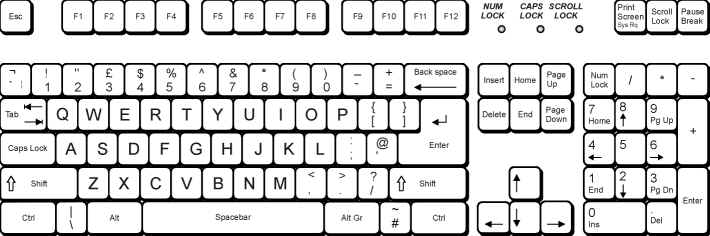
A computer Keyboard looks much like a typewriter keyboard, except that it has extra keys.
The Function Keys (F-keys) perform specific actions. Different software use the Function Keys differently. The Function Keys are located across the top of the keyboard and are labeled F1, F2, ...F12
There are three Modifier Keys on a keyboard: SHIFT, ALT, and CTRL. You use these keys in combination with another key(s).
BACK SPACE and/or DELETE are editing keys used to erase. BACK SPACE erases to the left of the cursor location; DELETE erases the current cursor location.
Directional arrows (Right, Left, Up, and Down), also called Cursor Movement Keys are used to move the cursor around in the document one character or one line at a time.
You can access Keyboard dialog box in a Windows computer by going to Control Panel, and double clicking Keyboard dialog box.
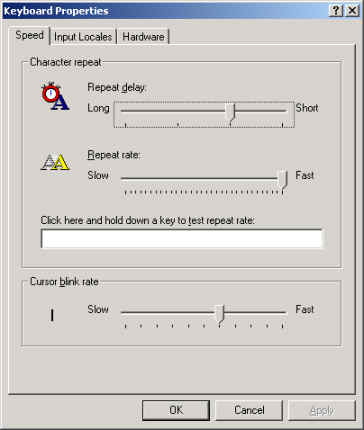
You can configure Character repeat delay, cursor blink rate, and other parameters as shown above. Normally, default setting will be sufficient for most users.
Multimedia devices: Commonly used multimedia devices include web cameras, microphones, and MIDI.
Web camera: A web camera, also called webcam, is a real-time camera (usually a video camera) that works in conjunction with a PC, and webcam software. The video or images produced by webcam can be accessed using the Internet applications such as instant messaging. Webcam images and videos are normally taken using low resolution camaras for facilitating fast transmission on the Internet.
Microphone: A microphone is used to record the voice, and normally used for voice/video communication over the Internet.
MIDI: It is an acronym for Musical Instrument Digital Interface. It is used for controlling devices, such as synthesizers and sound cards. At minimum, a MIDI representation of a sound includes values for the note's pitch, length, and volume. A number of software programs are available for composing and editing music that conforms to the MIDI standard.
You can configure MIDI devices using Sounds and Multimedia dialog box in the Control Panel.
Biometric Devices:Biometric devices provide biological identification of a person, and may include eyes, voice, handprints, fingerprints and hand-written signatures. Finger print scanner is an example of a biometric device.
Touch Screen: A touch screen is a computer display screen that is sensitive to human touch. Users can interact with the computer by touching pictures or words on the touch screen. Touch screens are used with information kiosks, computer-based training devices, and systems designed to help individuals who have difficulty manipulating a mouse or keyboard. Some applications, such as games are designed specifically for touch screen technology.
Disclaimer: Simulationexams.com is not affiliated with any certification vendor, and Sim-Ex™ Practice Exams are written independently by SimulationExams.com and not affiliated or authorized by respective certification providers. Sim-Ex™ is a trade mark of SimulationExams.com or entity representing Simulationexams.com.A+™ is a trademark of CompTIA® organization.
