2.0 Laptop and Portable Devices
2.1 Identify the fundamental principles of using laptops and portable devices
Function (Fn) keys:
Fn key is commonly found in notebook computers. The primary reason for providing an Fn key in notebooks is to ensure a compact keyboard. Fn is a modifier key on notebook keyboards and used to combine keys which are otherwise kept separate.
Unlike other modifier keys such as Shift , the control circuit inside the keyboard sends out a different key code depending on whether the Fn key is depressed. This allows the compact keyboard to provide functionality of a full sized keyboard.
The Fn key combinations may also be mapped to control system interfaces to change the LCD brightness and contrast, display output, eject a CD, or adjust speaker volume on laptop computers.
Touchpad:
Touchpad is an input device widely used in laptop computers. It is used to position or move the the curser according to the finger movement on the touchpad. A touchpad is similar to that of a mouse on a desktop computer. A typical touchpad is shown below:
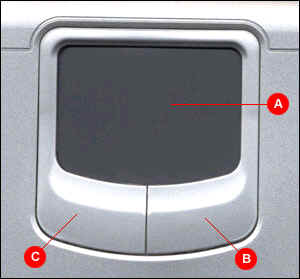
When you move your finger on the touchpad, the pointer (arrow) on the screen moves in the same direction.
The touchpad (A) also has a right button (B) and a left button (C). Use the left and right buttons below the touchpad to select objects, cut, paste, or drag objects.
Stylus/Digitizer:
Stylus is a pointing and drawing device shaped like a pen, and used with with a digitizing tablet or touch screen. The stylus point is made of a non scratching
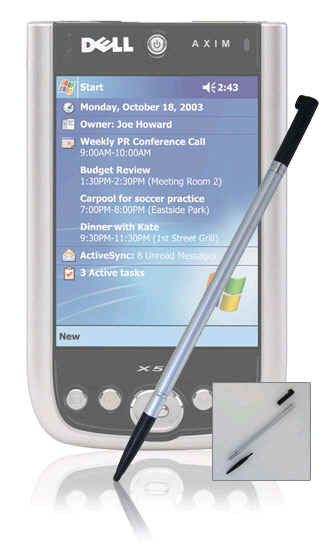
plastic to "write" on Personal Digital Assitants (PDAs) or any similar device screen.
A Dell Axim stylus pen is shown in the figure above.
Disclaimer: Simulationexams.com is not affiliated with any certification vendor, and Sim-Ex™ Practice Exams are written independently by SimulationExams.com and not affiliated or authorized by respective certification providers. Sim-Ex™ is a trade mark of SimulationExams.com or entity representing Simulationexams.com.A+™ is a trademark of CompTIA® organization.
