A CD-R stands for Compact Disc-Recordable. CD-R holds large volumes of data, in the range of 100s of MB, and replaced Floppy Disk Drives gradually. CD-R allows only one "Write" operation, and any number of "Read" operations. CD-RW stands for Compact Disc -ReWritable.
CD-Rs resemble DVDs as their physical dimensions are the same. The disks come in the dimensions of 120 mm (4.72 inches) or sometimes 80 mm (3.15 inches) in diameter. The technology used in CD-R, and DVD manufacture and information storage is completely different. DVDs have much higher storage density compared to CD-R or CD-RW.
CD-R or CD-RW comes in different speeds. At 1x a recorder writes 150 KB (153,600 bytes) of data per second and at a multiple of that figure at each speed increment above 1x.
| Specification | Speed |
| Initial Speed | 1x - 4x |
| High Speed | 4x - 12x |
| Ultra Speed | 16x - 24x |
| Ultra Speed | + 32x |
An IDE CDROM drive is shown in the figure below:
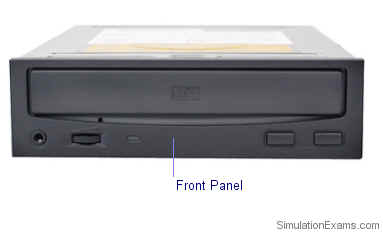
Front side of an IDE CDROM Drive
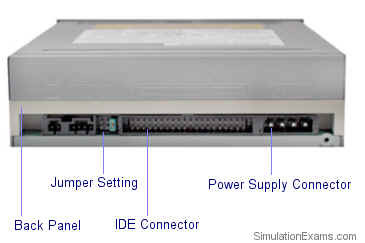
Back side of an IDE CDROM drive
Majority of IBM compatible PCs use IDE connector (or EIDE) for CDROM drives. Most of the HDDs use IDE/EIDE connectors. To avoid conflict between the two, CDROM drive is designated as "Slave", and the HDD is designated as "Master". The "Master", and "Slave" setting is typically done by configuring jumpers at the back of the CDR or HDD. The IDE controller recognizes the "Master" and "Slave" settings and chooses the correct device.
Download practice tests:
Download Sim-Ex™ Practice Exams for A+ Core 1
Download Sim-Ex™ Practice Exams for A+ Core 2
Related practice tests:
Sim-Ex™ Practice Exams for Network+
Sim-Ex™ Practice Exams for Server+
Sim-Ex™ Practice Exams for Security+
Disclaimer: Simulationexams.com is not affiliated with any certification vendor, and Sim-Ex™ Practice Exams are written independently by SimulationExams.com and not affiliated or authorized by respective certification providers. Sim-Ex™ is a trade mark of SimulationExams.com or entity representing Simulationexams.com.A+™,Network+™,Security+™,Server+™ are trademark of CompTIA® organization.
